WinWrap® Basic is an embedded macro language component available for .NET and COM 32/64 bit Windows applications. The WinWrap® Basic Component is an alternative to Visual Basic for Applications (VBA), ActiveX (e.g. VBScript, JScript, PerlScript, Rexx-based WSH engines and others), and VSTA for this purpose. The WinWrap® Basic Component is compatible with VBA, Sax Basic, VB.NET and Visual Basic 6.0 style scripts.
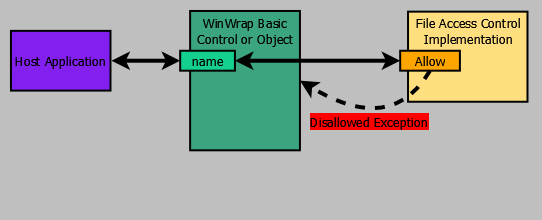
Reading and writing files is a convenient feature, however, there are times when accessing the local file system in not desirable. In that case your application can redefine how scripts access files. Different user's running the same script can access files specific to the user without modifying the script.
The following implementation of IFileAccessControl treats file names as simple names. Simple names are translated into full path names in the script's directory. This is a useful approach for restricting file access within the actual file system.
Allowed access can be customized based on the type of access action requested by the script.
| Action | WWB-COM | WWB.NET |
|---|---|---|
| Copy:From | FileCopy | FileCopy |
| Copy:To | FileCopy | FileCopy |
| CreateDirectory | MkDir | MkDir |
| Delete | Kill | Kill |
| DeleteDirectory | RmDir | RmDir |
| FileDateTime | FileDateTime | FileDateTime |
| GetAttr | GetAttr | GetAttr |
| GetDirectory | Dir | Dir |
| Open:Read | Open | FileOpen |
| Open:ReadWrite | Open | FileOpen |
| Open:Write | Open | FileOpen |
| Rename:From | Name | Rename |
| Rename:To | Name | Rename |
| SetAttr | SetAttr | SetAttr |
Refer to IFileAccessControl.Allow for more information.
 © PolarEngineering®, Inc.